
.png)
Description
Download AI Interview Coach – AI‑powered interview preparation tool, free and secure
Introduction
Landing a coveted tech role in today’s fast‑moving job market often hinges on one decisive factor: how you perform in the interview. While a strong résumé can get you through the first screening, the interview is where candidates prove they have the technical depth, problem‑solving mindset, and communication skills that employers demand. Traditional preparation methods—reading books, watching videos, or attending costly workshops—can leave gaps, especially when it comes to practicing real‑world, role‑specific questions. That’s where AI Interview Coach steps in. Powered by the latest GPT‑4 language model, this application delivers a dynamic, on‑demand interview simulation experience that mimics the cadence of actual hiring conversations. Whether you’re a fresh graduate eyeing your first software engineering role, a mid‑career professional transitioning into data science, or a senior architect aiming to sharpen your storytelling, AI Interview Coach adapts to your career stage and industry focus. Its cloud‑based architecture ensures that practice sessions are always up‑to‑date with the newest trends, while robust security measures protect your personal data. By offering a free core version that already packs high‑quality question generation and personalized feedback, the tool lowers the barrier to entry for anyone who wants to practice confidently, iteratively, and without the pressure of a live audience. In the sections that follow we’ll dive deep into the platform’s standout features, walk through the installation process across all major operating systems, and evaluate the pros and cons to help you decide whether this AI‑driven assistant belongs in your interview‑prep toolkit.
Overview
In today’s hyper‑competitive job market, a well‑crafted interview performance can be the deciding factor between landing a dream role and missing out. AI Interview Coach steps into this space as a cutting‑edge, GPT‑4‑driven software application that mimics real‑world interview scenarios, delivers personalized feedback, and equips candidates with actionable strategies to ace their interviews. Designed with a focus on tech positions in London, the tool pulls from a curated database of industry‑specific questions, enabling users to practice as if they were sitting across from a senior hiring manager. Whether you’re a fresh graduate nervous about your first interview, a mid‑career professional transitioning into a new domain, or an experienced developer aiming to polish your storytelling, AI Interview Coach tailors the experience to your selected role and industry. By presenting realistic prompts, evaluating your written responses, and suggesting improvements in tone, structure, and content, the platform helps reduce interview anxiety and builds confidence. Although it does not yet support live video analysis or non‑verbal cue assessment, its strength lies in providing detailed, text‑based critiques that are instantly available, 24/7, and completely free of cost. The application runs on Windows, macOS, Android, and iOS, making it a versatile companion for anyone serious about improving interview outcomes.
Key Features of AI Interview Coach
- GPT‑4 Powered Question Engine: Generates role‑specific interview questions that reflect current market trends and company expectations.
- Personalized Feedback Loop: Analyzes user answers, highlighting strengths, pointing out gaps, and offering concrete suggestions for improvement.
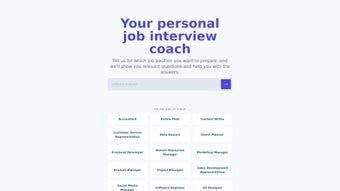
- Multiple Job Positions & Industries: Supports a wide range of tech roles—from front‑end developer to data scientist—plus emerging fields like AI product management.
- Integrated Tech‑Job Listings for London: Provides up‑to‑date listings of tech vacancies in London, allowing users to align practice sessions with real openings.
- Progress Tracking Dashboard: Monitors practice sessions, scores, and improvement trends over time, helping users stay motivated.
- Secure Cloud Storage: Saves user responses securely, ensuring privacy while allowing seamless access across devices.
- Free Core Version: Offers essential interview preparation features at no cost, with optional premium upgrades for deeper analytics.
The feature set of AI Interview Coach reflects a thoughtful blend of AI sophistication and user‑centric design. By leveraging GPT‑4, the platform can adapt questions to the nuances of each role, ensuring relevance whether you’re interviewing for a junior JavaScript position or a senior DevOps lead. The personalized feedback not only points out grammatical errors but also evaluates the logical flow of your answers, encouraging you to adopt the STAR (Situation, Task, Action, Result) technique where appropriate. Moreover, the built‑in job board for London tech roles keeps the practice grounded in real market demand, allowing candidates to prioritize preparation for positions that truly interest them. The progress dashboard visualizes improvement metrics—such as average response length, keyword usage, and confidence scores—making it easy to identify patterns and focus on weak areas. While the free tier already packs considerable value, the optional premium upgrade unlocks deeper sentiment analysis, a larger question bank, and the ability to export feedback in custom formats, catering to power users who want an extra edge. Overall, the feature collection positions AI Interview Coach as a comprehensive, secure, and scalable solution for anyone looking to enhance their interview skill set without the need for costly coaching services.
Installation, Setup, and Usage Guide
Getting started with AI Interview Coach is straightforward, regardless of whether you’re on a desktop or mobile device. Below is a step‑by‑step walkthrough covering download, installation, initial configuration, and daily usage.
Step 1: Download the Application
- Visit the official website aiinterviewcoach.com or locate the app in the Apple App Store or Google Play Store.
- Click the “Download Free” button for Windows/macOS or tap “Install” for Android/iOS.
- The installer will be saved to your default downloads folder (desktop) or your mobile device’s app library.
Step 2: Install & Launch
- On Windows, run the
.exefile and follow the wizard prompts (accept license, choose install location). - On macOS, open the
.dmg, drag the app to the Applications folder, and launch from Launchpad. - Mobile users simply tap “Open” after installation completes.
Step 3: Create Your Profile
- Enter a valid email address and set a strong password. You may also sign in via Google or LinkedIn for quicker onboarding.
- Choose your primary industry (e.g., “FinTech”, “HealthTech”) and select up to three target job titles.
- Optionally, enable two‑factor authentication for enhanced security.
Step 4: Configure Practice Settings
- Navigate to “Settings → Practice Mode.” Choose the difficulty level (Beginner, Intermediate, Advanced).
- Toggle “Include Behavioural Questions” if you want a mix of technical and soft‑skill prompts.
- Set a daily practice goal (e.g., 5 questions per session).
Step 5: Start Practicing
- Click “Start Session.” The AI will present a question tailored to your selected role.
- Type your answer in the provided text box. The system records your response and, after submission, delivers a feedback report highlighting structure, keyword relevance, and tone.
- Save the feedback or export it as a PDF for offline review.
Compatibility
AI Interview Coach is built on a cross‑platform framework, ensuring seamless performance on:
- Windows 10 or later (64‑bit)
- macOS 11 (Big Sur) or later
- Android 8.0 (Oreo) and above
- iOS 13 and above
The application requires a minimum of 2 GB RAM and 150 MB of free disk space. An active internet connection is needed for AI processing and cloud storage synchronization. For optimal performance, we recommend using a broadband connection with at least 5 Mbps download speed.
The core version is completely free. A premium upgrade is available for $9.99/month, unlocking advanced sentiment analysis and an expanded question bank.
Conclusion: Should You Download AI Interview Coach?
Pros
- Free core version delivers high‑quality, GPT‑4‑driven interview simulations.
- Personalized, text‑based feedback helps reduce anxiety and improve answer structure.
- Supports multiple tech roles and integrates a live London tech‑job board.
- Cross‑platform compatibility (Windows, macOS, Android, iOS) ensures flexibility.
- Secure cloud storage and optional two‑factor authentication protect user data.
Cons
- No real‑time video analysis or non‑verbal cue evaluation.
- Limited to English language; multilingual support is unavailable.
- Job‑position library, while extensive, does not cover every niche role.
- Premium upgrade required for advanced sentiment analytics.
- Feedback is text‑only; users seeking spoken mock interviews must supplement with other tools.
Frequently Asked Questions
Is AI Interview Coach really free?
Yes, the core version is completely free. It includes unlimited practice sessions, basic feedback, and access to the London tech‑job board. A premium tier is optional for deeper analytics.
Can I use the app on both my laptop and phone?
Absolutely. AI Interview Coach syncs your data via secure cloud storage, so your progress is available across Windows, macOS, Android, and iOS devices.
How does the feedback improve my interview skills?
The AI evaluates answer structure, relevance to the job description, keyword usage, and tone. It then provides specific suggestions—like adding measurable results or rephrasing for clarity—helping you craft concise, compelling responses.
Is my data safe?
Yes. All data is encrypted in transit and at rest. Users can enable two‑factor authentication for an extra layer of security.
Do I need an internet connection to practice?
An active internet connection is required for the AI to generate questions and provide feedback. Offline mode is not currently supported.
Final Verdict & Call to Action
If you’re looking for a secure, AI‑driven solution that can simulate real interview scenarios, give you detailed written feedback, and keep you organized across devices, AI Interview Coach is a solid choice—especially for tech professionals targeting London’s vibrant market. Its free tier covers the essentials, and the optional premium upgrade offers deeper insights for power users. Download the app today, set up your profile, and start practicing. The sooner you start, the faster your confidence will grow, and the better your chances of landing that coveted position.
AI Interview Coach delivers an impressive blend of AI sophistication and user‑friendly design. While it lacks live video analysis, its text‑based feedback is thorough and actionable, making it an excellent supplement to any interview preparation toolkit.
Guides & Tutorials for AI Interview Coach
How to install AI Interview Coach
- Click the Preview / Download button above.
- Once redirected, accept the terms and click Install.
- Wait for the AI Interview Coach download to finish on your device.
How to use AI Interview Coach
This software is primarily used for its core features described above. Open the app after installation to explore its capabilities.
User Reviews for AI Interview Coach 0
No reviews found




